




An AI Agent for WhatsApp and 5 more channels

The 2 a.m. chat still gets answered, all the way to an order.

Orqestra's AI Agent answers from your own business data, checks stock, schedules or bookings, and brings in your team the moment a person needs to decide.

  • Official WhatsApp Business API
  • Meta Business Partner

Trusted by teams who serve customers every day

  • HMT Studio
  • BustoDev
  • Oveersea
  • Alsmart
  • Serasa
  • weFinite

How it works

One conversation, from the ad to the next order.

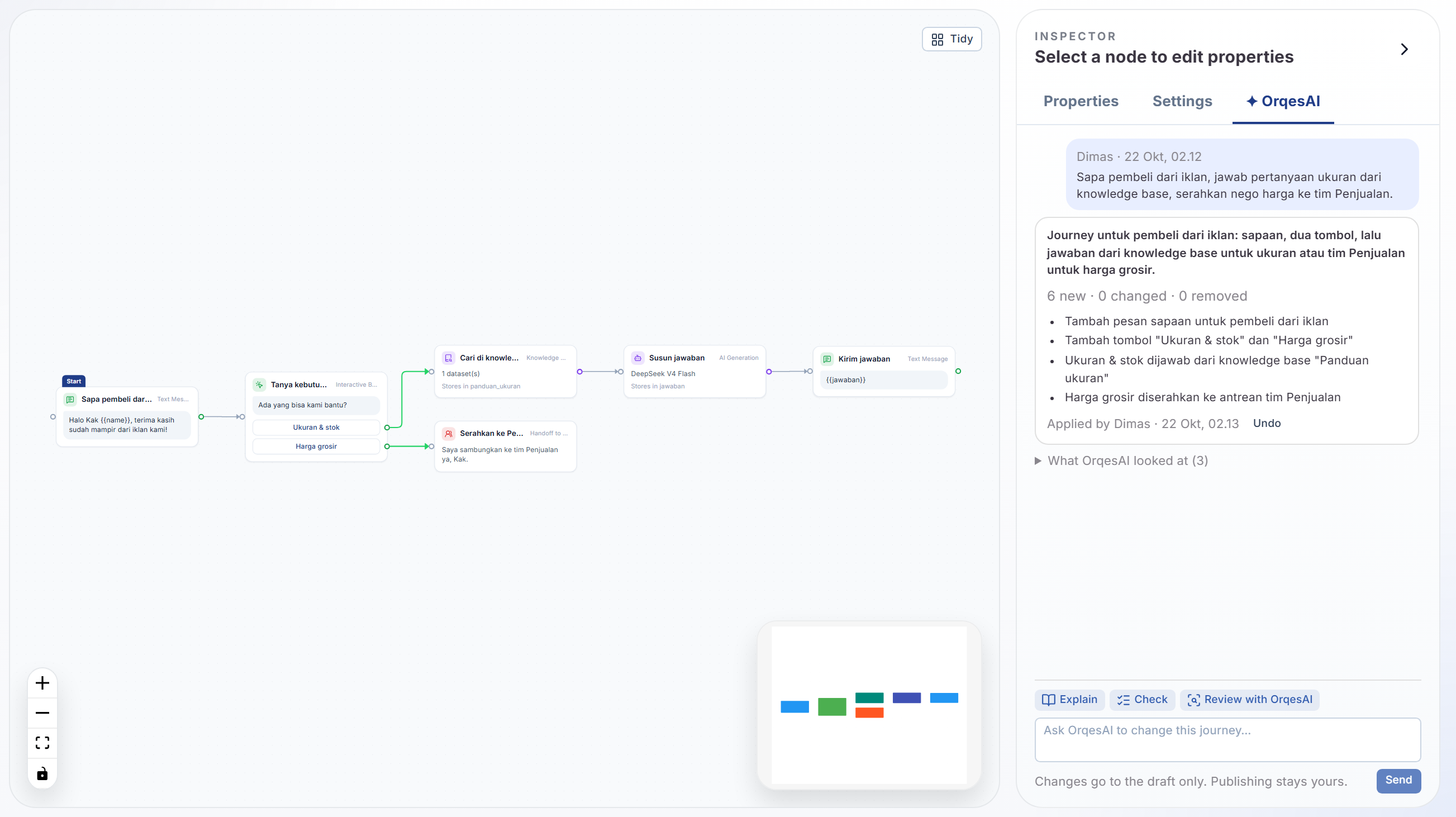
The example is a clothing shop. The flow is the same for a hotel taking reservations, a clinic booking appointments, a school, or any business that serves customers over chat.

Tap the ad, start the chat.

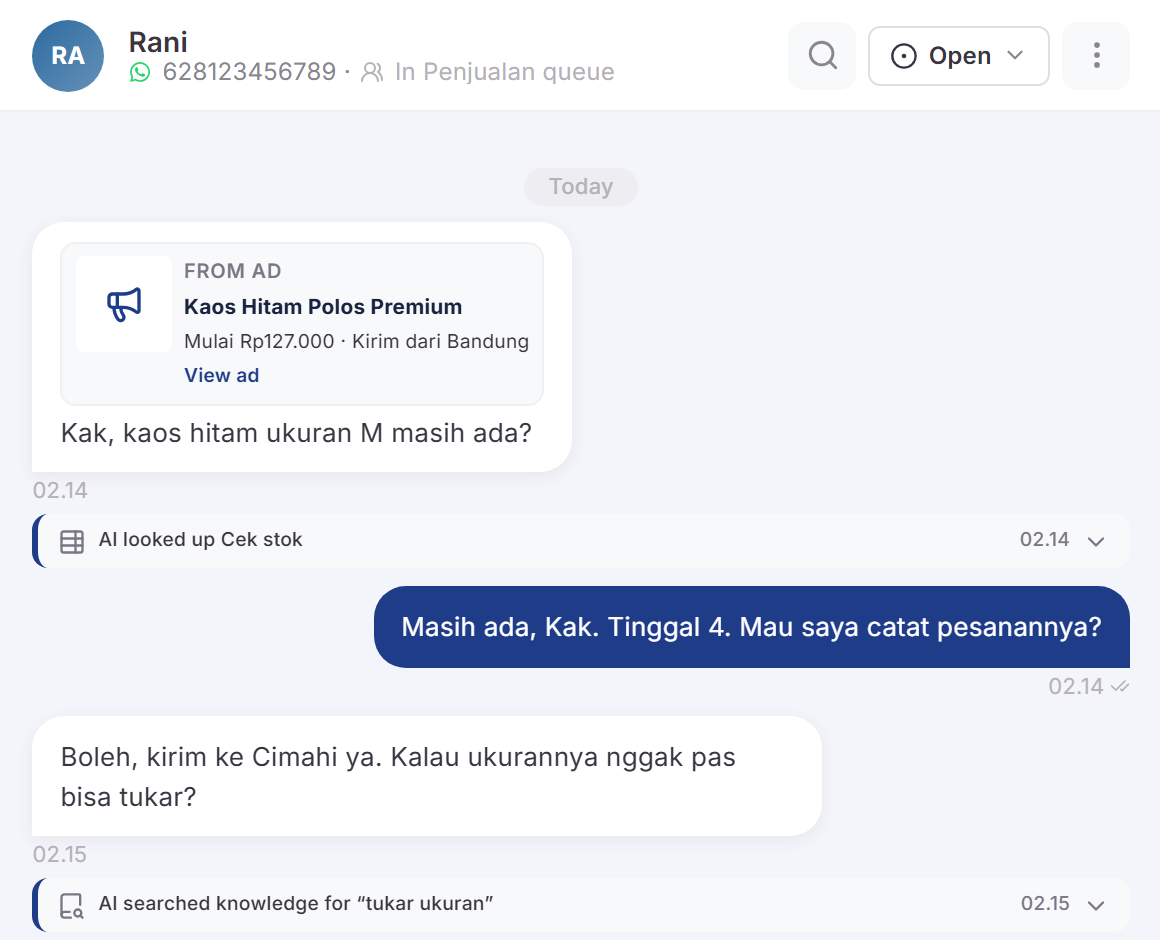
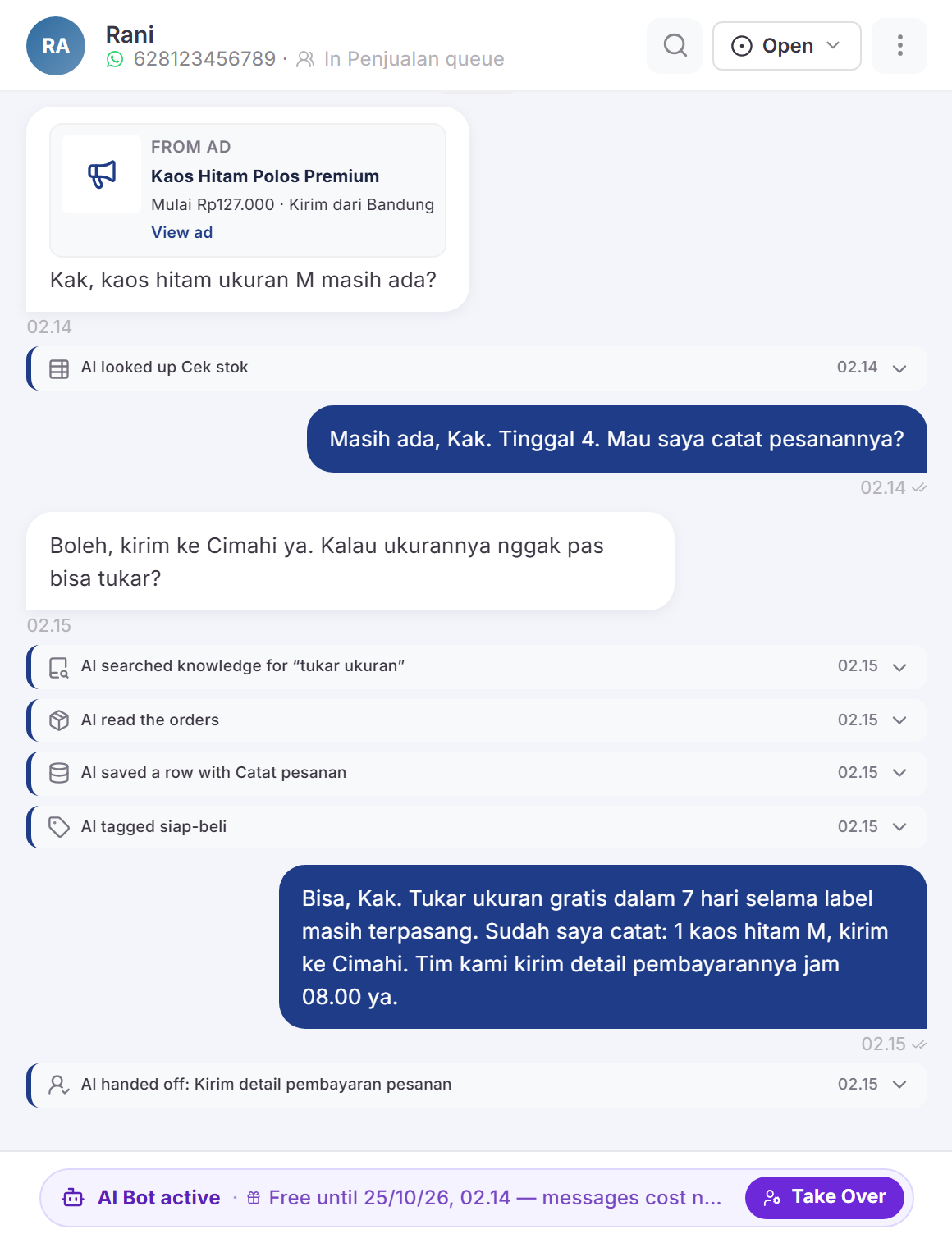
Rani sees a T-shirt ad on Instagram and taps the WhatsApp button. Her chat arrives in Orqestra with the ad it came from, so you know which ad brought the buyer. Chats from Instagram, Telegram, TikTok Shop, email and web chat join the same queue.

  • WhatsApp
  • Instagram
  • Web Chat
  • Telegram
  • TikTok Shop
  • Email
Rani’s chat in the Orqestra inbox, carrying the ad it came from

Results

What changes when this runs every day

Before Orqestra, my admin team — one person — was struggling badly to handle roughly 300–600 customers a day. It was hard to balance heavy ad performance against the quality and speed of our replies. With the AI flow in Orqestra, all of it is handled, nothing gets missed, and nobody waits.
AlharFounder, Alsmart Neon BandungTranslated from Indonesian
70%

of conversations resolved by AI with no agent

Last 30 days
They even helped us through Meta Business verification and getting the blue tick.
HaechelManaging Director, Oveersea GlobalTranslated from Indonesian
24%

increase in sales after adopting Orqestra

Based on data from one client

Orqestra helps clients handle 1,000+ messages a day with AI that understands the situation and the context — and that turns into sales.

Orqestra’s dynamic segments let me broadcast to exactly the right group — 500 messages to past attendees brought in 53 new webinar registrations.
Aul FazaCOO, Harmoni Mitra TeknoTranslated from Indonesian

Control

It stays in your hands.

The AI does the repetitive work. The decisions that matter, the access and the spend stay yours.

People decide

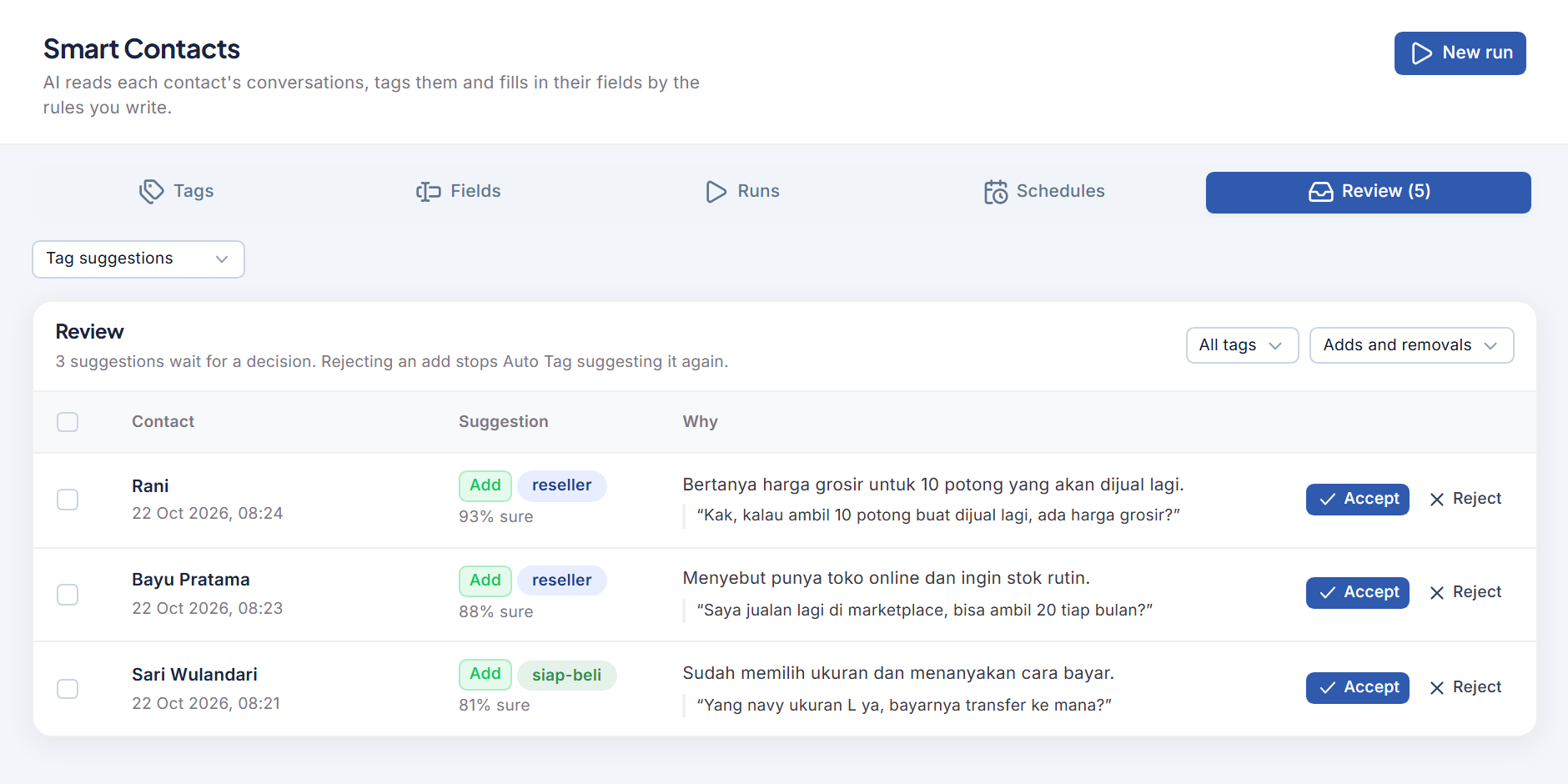
Builder Assist only proposes; Publish stays yours. Smart Contacts never removes a tag on its own, it suggests it. When a chat goes to your team is set by your rules.

AI actions are limited and logged

Each tool can do only what its allowlist names, and that limit is checked on the server. Every action shows in the conversation timeline, so your team can see what the AI did.

Access per role and per channel

Decide who sees which conversations, limit agents to specific channels, and require two-step verification for the whole team.

Pay for what you use

AI credits sit apart from your plan and can be topped up any time. We tell you before you hit a limit, so there is no surprise bill.

  • WhatsApp
  • Instagram
  • Web Chat
  • Telegram
  • TikTok Shop
  • Email
  • Webhook

Connected wherever your customers already are.

Six official channels, a public REST API and webhooks, so Orqestra fits the way you already work.

Official channels

WhatsApp Cloud API, Instagram Graph API, Telegram Bot API, TikTok Shop Customer Service API, web chat, and your own mailbox over IMAP and SMTP. All through official routes, never an unofficial bridge that can be cut off without warning.

See supported channels

Setup & onboarding

Starting from nothing is fine. Our team walks you through Meta Business verification and WhatsApp API configuration — included on Pro and Enterprise, available as an add-on for Starter.

Questions about setup

API & webhooks

Send messages, sync contacts, and trigger Journeys from your CRM or internal systems. Bearer token authentication, an OpenAPI specification, and a Swagger UI you can send real requests from.

Open the API docs

Videos

See Orqestra at work

See all on YouTube
  • Cara Membuat Automasi WhatsApp dengan AI di Orqestra | Tutorial Journey Automation

  • Buat Automasi Whatsapp Dengan Orqestra

  • Reply Assist - Orqestra (OrqesAI)

FAQ

Frequently asked questions.

Still stuck? Send us your question — we reply on business days.

Yes. Orqestra covers WhatsApp Business operations and Instagram engagement features such as comment moderation, content management, and auto-reply. The focus stays customer-first: helping your team respond faster and more consistently.

Yes — WhatsApp features require official WhatsApp Cloud API access. Our team sets this up with you during onboarding so it is faster and safer than doing it alone.

Co-Existence lets you keep using your existing WhatsApp Business number while connecting it to Orqestra. Migration is smoother, operations never stop entirely, and your team can move across gradually.

Connect your Instagram Business account through Meta login on the integrations page. Once linked, comment moderation, content management, and Instagram auto-reply are available from the Orqestra dashboard.

Automation flows organise how customers are answered: automatic messages, branching on intent or keyword, triggering HTTP requests (a booking, for example), and handing off to an agent when needed.

A session begins when an agent starts handling a conversation and ends when it is closed or times out (24 hours maximum), matching the WhatsApp 24-hour window. Your session limit is how many conversations your team can handle per month.

Yes — a complete setup service, from Meta Business verification through to WhatsApp API configuration. It is included on Pro and Enterprise, and available as an add-on for Starter.

We notify you before you reach it. Broadcast and AI credits can be topped up separately, and an upgrade takes effect immediately. Broadcast messages beyond your limit are simply not sent — there is no surprise charge.

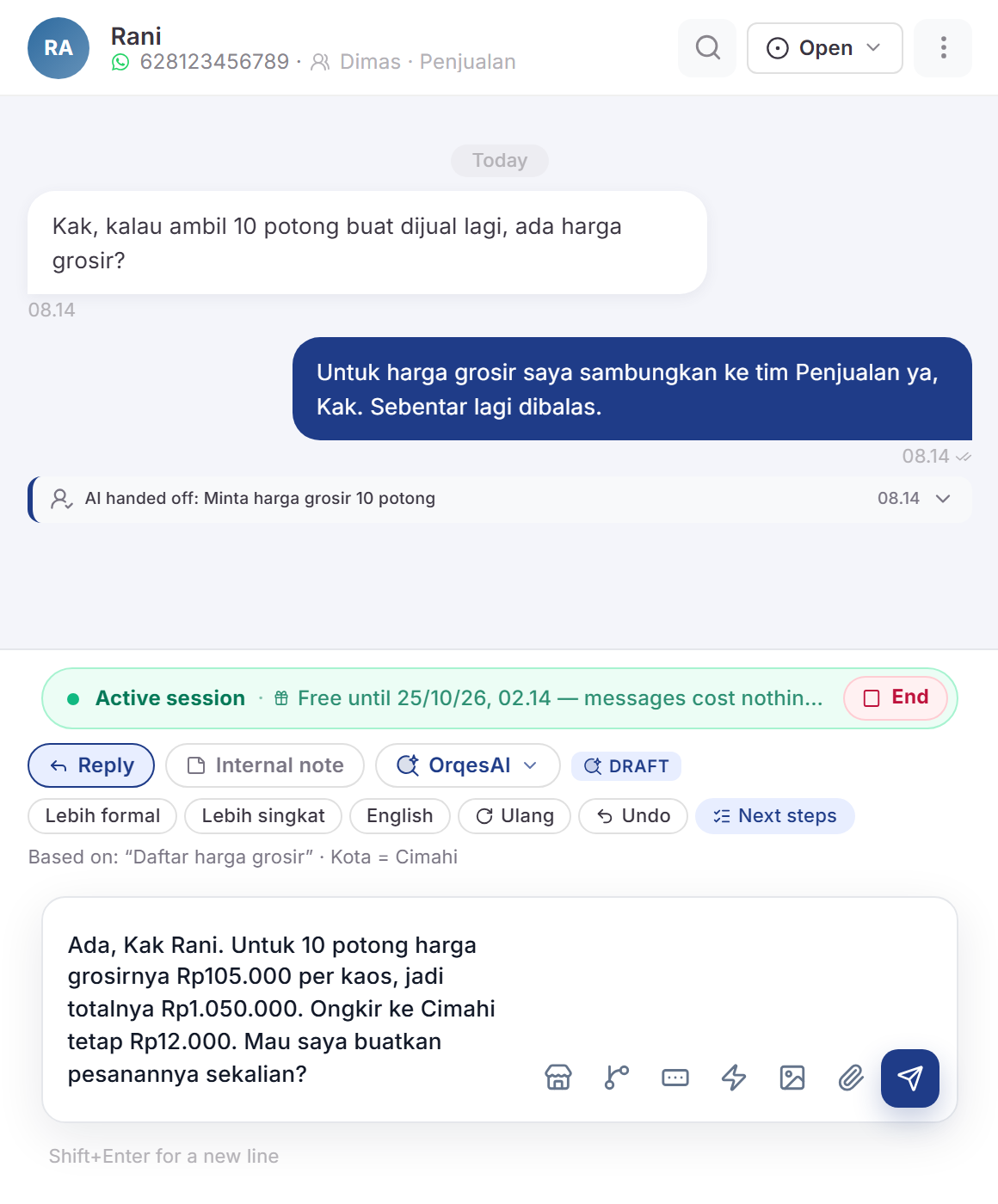
Reply Assist sits in the inbox reply box. It drafts a reply from the conversation, changes the tone, translates, summarises long chats, reads images customers send, and suggests next steps. A draft never sends itself: the agent edits it and presses Send.

The AI Agent is instructed to answer from your knowledge base and the data you connect. Its actions are limited to each tool’s allowlist, and you decide when a chat goes to your team, for example when a customer haggles or asks for a person. Every answer and action is logged in the conversation, so a mistake is easy to find and fix in the knowledge base.

Plain text (.txt), Markdown (.md) and CSV files up to 10 MB each, or text pasted in directly. FAQs, return policies, price lists and product guides are the usual starting point.

No. Every plan is monthly with no commitment. Annual plans get a discount (10–25% depending on tier) and can be cancelled at any time.

See an AI Agent work your own flow

A 30-minute demo with our team. We set up an AI Agent for your own workflow and try it together.

No credit card · Setup assisted by our team